
ForgeSIM Framework Overview
ForgeSIM™ is ForgeFX Simulations’ proprietary simulation platform on which all of our training simulations are built. Developed over 20+ years of enterprise simulation delivery, ForgeSIM provides a comprehensive, modular framework for building immersive training experiences across VR, AR, desktop, mobile, and web platforms.
Built on industry-standard Unity technologies, ForgeSIM enables rapid development through reusable components, standardized pipelines, and cross-platform deployment. Clients own all source code and assets we create; there are no license fees or per-seat costs associated with our simulators. The framework consists of modular packages that can be combined to create custom training simulations tailored to specific needs, from medical device training to heavy equipment operation.
ForgeSim.Core
ForgeSim.Core is the foundational package that provides essential functionality used across all ForgeSim components. It includes core systems for text animation, scene management, state machines, audio-reactive materials, and comprehensive localization support. The core package ensures consistency and reusability across all ForgeSim-based training simulations.
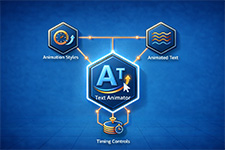
Text Animator creates dynamic text animations with ease, enabling developers to build engaging user interfaces and instructional content.
This component provides flexible animation controls for text elements, supporting various animation styles and timing options to enhance the visual presentation of training content.
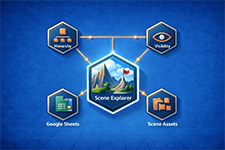
Scene Explorer provides enhanced scene navigation and management capabilities within Unity.
This tool offers improved visibility and organization of scene hierarchies, making it easier for developers to navigate complex training simulation environments and manage scene assets efficiently.
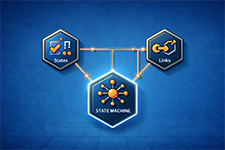
The State Machine component provides a flexible state management system for controlling simulation flow and behavior.
This system enables developers to define clear state transitions, manage complex simulation logic, and create robust training scenarios with predictable state-based interactions.

ForgeSim.Core includes a comprehensive localization framework that supports multi-language training simulations. The system integrates with Google Sheets for translation management, enabling teams to efficiently manage and update translations across multiple languages. This ensures training content can be deployed globally while maintaining consistency and quality.
Text Animator creates dynamic text animations with ease, enabling developers to build engaging user interfaces and instructional content.
This component provides flexible animation controls for text elements, supporting various animation styles and timing options to enhance the visual presentation of training content.
Scene Explorer provides enhanced scene navigation and management capabilities within Unity.
This tool offers improved visibility and organization of scene hierarchies, making it easier for developers to navigate complex training simulation environments and manage scene assets efficiently.
The State Machine component provides a flexible state management system for controlling simulation flow and behavior.
This system enables developers to define clear state transitions, manage complex simulation logic, and create robust training scenarios with predictable state-based interactions.
ForgeSim.Core includes a comprehensive localization framework that supports multi-language training simulations. The system integrates with Google Sheets for translation management, enabling teams to efficiently manage and update translations across multiple languages. This ensures training content can be deployed globally while maintaining consistency and quality.
ForgeSim.Lesson
ForgeSim.Lesson provides specialized tools for creating interactive educational experiences and structured training content. The lesson package includes guidance systems, lesson data management, and specialized localization support tailored for educational content. This package enables developers to build comprehensive, step-by-step training modules with built-in progress tracking and assessment capabilities.

The Guidance System provides best practices and tools for creating effective interactive lessons.It includes guidance sequences, failure response handling, and guidance observers that monitor user progress. This system enables developers to create adaptive training experiences that respond to user actions and provide contextual feedback throughout the learning process.

Lesson Data management provides structured storage and retrieval of lesson content, including lesson steps, objectives, and assessment criteria.This system enables developers to define reusable lesson templates and manage complex training curricula with consistent data structures.

Lesson Localization offers specialized localization support for educational content, ensuring that training materials can be effectively translated and culturally adapted for different regions.This system works seamlessly with the core localization framework while providing lesson-specific features for managing instructional text, audio, and multimedia content.

Guidance Observers monitor user interactions and lesson progress, enabling dynamic adaptation of training content based on user performance.These observers track completion status, failure responses, and variable states to provide intelligent feedback and adjust lesson difficulty in real-time.
The Guidance System provides best practices and tools for creating effective interactive lessons.It includes guidance sequences, failure response handling, and guidance observers that monitor user progress. This system enables developers to create adaptive training experiences that respond to user actions and provide contextual feedback throughout the learning process.
Lesson Data management provides structured storage and retrieval of lesson content, including lesson steps, objectives, and assessment criteria.This system enables developers to define reusable lesson templates and manage complex training curricula with consistent data structures.
Lesson Localization offers specialized localization support for educational content, ensuring that training materials can be effectively translated and culturally adapted for different regions.This system works seamlessly with the core localization framework while providing lesson-specific features for managing instructional text, audio, and multimedia content.
Guidance Observers monitor user interactions and lesson progress, enabling dynamic adaptation of training content based on user performance.These observers track completion status, failure responses, and variable states to provide intelligent feedback and adjust lesson difficulty in real-time.
ForgeSim.MRTK
ForgeSim.MRTK provides integration with Microsoft Mixed Reality Toolkit, enabling developers to build immersive mixed reality training experiences. This package extends ForgeSim capabilities into the mixed reality space, supporting devices like Microsoft HoloLens and Windows Mixed Reality headsets. The integration maintains consistency with ForgeSim patterns while leveraging MRTK’s powerful spatial computing capabilities.

ForgeSim.MRTK seamlessly integrates Microsoft Mixed Reality Toolkit functionality with the ForgeSim framework.This integration enables developers to leverage MRTK’s hand tracking, spatial mapping, and gesture recognition capabilities while maintaining the familiar ForgeSim development patterns and component architecture.

Spatial interaction capabilities enable users to interact with virtual training content using natural hand gestures and spatial positioning.This system supports air tap, hand ray, and direct manipulation gestures, allowing for intuitive interaction with 3D training objects and interfaces in mixed reality environments.

Full support for Microsoft HoloLens devices enables deployment of ForgeSim training simulations on enterprise mixed reality hardware.This includes optimization for HoloLens display capabilities, performance tuning for spatial computing workloads, and support for HoloLens-specific features like eye tracking and spatial audio.

ForgeSim.MRTK includes support for OpenXR standards, ensuring compatibility with a wide range of mixed reality devices beyond HoloLens.This OpenXR integration provides a future-proof foundation for mixed reality training simulations, supporting devices from multiple manufacturers through a unified API.
ForgeSim.MRTK seamlessly integrates Microsoft Mixed Reality Toolkit functionality with the ForgeSim framework.This integration enables developers to leverage MRTK’s hand tracking, spatial mapping, and gesture recognition capabilities while maintaining the familiar ForgeSim development patterns and component architecture.
Spatial interaction capabilities enable users to interact with virtual training content using natural hand gestures and spatial positioning.This system supports air tap, hand ray, and direct manipulation gestures, allowing for intuitive interaction with 3D training objects and interfaces in mixed reality environments.
Full support for Microsoft HoloLens devices enables deployment of ForgeSim training simulations on enterprise mixed reality hardware.This includes optimization for HoloLens display capabilities, performance tuning for spatial computing workloads, and support for HoloLens-specific features like eye tracking and spatial audio.
ForgeSim.MRTK includes support for OpenXR standards, ensuring compatibility with a wide range of mixed reality devices beyond HoloLens.This OpenXR integration provides a future-proof foundation for mixed reality training simulations, supporting devices from multiple manufacturers through a unified API.
Developer Tools
ForgeSim includes powerful developer tools that streamline the development and debugging process. The In-Game Developer Console provides real-time debugging capabilities during gameplay, while maintainer tools support framework extension and testing. These tools enable rapid iteration and efficient troubleshooting throughout the development lifecycle.

The In-Game Developer Console is a powerful debugging and development tool accessible during gameplay.This console provides real-time access to system commands, variable inspection, and debugging utilities without requiring a separate development build. Developers can test features, modify parameters, and diagnose issues directly within the running simulation.

InspectorNotes allows developers to add contextual notes directly to Unity components in the Inspector.This feature improves code documentation and team collaboration by enabling developers to leave implementation notes, usage instructions, and important reminders directly within the Unity editor interface.
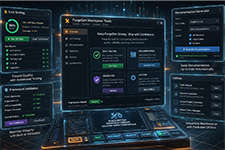
Maintainer tools, like Issues Finder, References Finder, and Project Cleaner provide utilities for extending and maintaining the ForgeSim framework itself.These tools support unit testing, documentation generation, and framework validation, ensuring the continued quality and reliability of the ForgeSim codebase as it evolves.
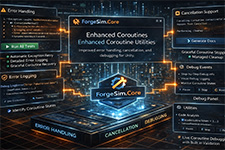
ForgeSim.Core includes enhanced coroutine utilities that extend Unity’s built-in coroutine system with additional functionality.These enhancements provide better error handling, cancellation support, and debugging capabilities for asynchronous operations in training simulations.
The In-Game Developer Console is a powerful debugging and development tool accessible during gameplay.This console provides real-time access to system commands, variable inspection, and debugging utilities without requiring a separate development build. Developers can test features, modify parameters, and diagnose issues directly within the running simulation.
InspectorNotes allows developers to add contextual notes directly to Unity components in the Inspector.This feature improves code documentation and team collaboration by enabling developers to leave implementation notes, usage instructions, and important reminders directly within the Unity editor interface.
Maintainer tools, like Issues Finder, References Finder, and Project Cleaner provide utilities for extending and maintaining the ForgeSim framework itself.These tools support unit testing, documentation generation, and framework validation, ensuring the continued quality and reliability of the ForgeSim codebase as it evolves.
ForgeSim.Core includes enhanced coroutine utilities that extend Unity’s built-in coroutine system with additional functionality.These enhancements provide better error handling, cancellation support, and debugging capabilities for asynchronous operations in training simulations.
Production Pipeline
ForgeSIM is delivered through a structured, battle-tested production pipeline that ensures consistent quality and predictable timelines. From ideation through deployment, every project follows a repeatable process with clear milestones, client touchpoints, and quality gates. This pipeline has been refined across dozens of enterprise simulation projects.

Every ForgeSIM project follows a structured flow: Ideation and Pre-Production (defining goals, training outcomes, lesson structure), Asset Production (client delivers CAD and reference materials, ForgeFX delivers scripts and storyboards), SME Approval (subject matter experts review and approve content), Technical Development (building the interactive application using Unity and ForgeSIM), QA and Feedback (internal testing, bug fixes, client review), and Deployment (final build delivered via App Lab or enterprise pipeline). This repeatable process ensures nothing is left to chance.

Projects progress through clearly defined milestone stages: Pre-Production (asset gathering, CAD, branding, reference materials), Pre-Alpha (initial framework and feature prototypes), Alpha (core features functional, content in progress), Beta (feature-complete, polish and optimization), Release Candidate (final QA, client sign-off), and Gold Master (locked build, ready for deployment). The Gold Master is locked unless critical fixes are required, ensuring production stability.

All ForgeSIM technology projects are delivered by self-contained, cross-functional pods: a dedicated development team of 5-6 specialists including a Technical Producer, Technical Artist, 3D Generalist, Systems Programmer, and Content Developer. Each pod delivers one new lesson and one supporting feature per month in a predictable cadence. Pods scale horizontally: add pods for parallel clients or faster delivery. This productized model replaces unpredictable custom project chaos with an orderly subscription-like execution engine.
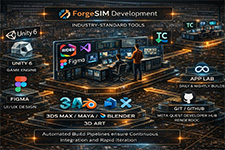
ForgeSIM development leverages industry-standard tools: Unity 6 (game engine), JetBrains Rider and Visual Studio (IDE), Figma (UI/UX design), 3ds Max, Maya, and Blender (3D art), Jira and Confluence (project management), Git and GitHub (version control), TeamCity (automated CI/CD with daily and nightly builds), App Lab (deployment), and Meta Quest Developer Hub with RenderDoc (performance profiling). Automated build pipelines ensure continuous integration and rapid iteration.
Every ForgeSIM project follows a structured flow: Ideation and Pre-Production (defining goals, training outcomes, lesson structure), Asset Production (client delivers CAD and reference materials, ForgeFX delivers scripts and storyboards), SME Approval (subject matter experts review and approve content), Technical Development (building the interactive application using Unity and ForgeSIM), QA and Feedback (internal testing, bug fixes, client review), and Deployment (final build delivered via App Lab or enterprise pipeline). This repeatable process ensures nothing is left to chance.
Projects progress through clearly defined milestone stages: Pre-Production (asset gathering, CAD, branding, reference materials), Pre-Alpha (initial framework and feature prototypes), Alpha (core features functional, content in progress), Beta (feature-complete, polish and optimization), Release Candidate (final QA, client sign-off), and Gold Master (locked build, ready for deployment). The Gold Master is locked unless critical fixes are required, ensuring production stability.
All ForgeSIM technology projects are delivered by self-contained, cross-functional pods: a dedicated development team of 5-6 specialists including a Technical Producer, Technical Artist, 3D Generalist, Systems Programmer, and Content Developer. Each pod delivers one new lesson and one supporting feature per month in a predictable cadence. Pods scale horizontally: add pods for parallel clients or faster delivery. This productized model replaces unpredictable custom project chaos with an orderly subscription-like execution engine.
ForgeSIM development leverages industry-standard tools: Unity 6 (game engine), JetBrains Rider and Visual Studio (IDE), Figma (UI/UX design), 3ds Max, Maya, and Blender (3D art), Jira and Confluence (project management), Git and GitHub (version control), TeamCity (automated CI/CD with daily and nightly builds), App Lab (deployment), and Meta Quest Developer Hub with RenderDoc (performance profiling). Automated build pipelines ensure continuous integration and rapid iteration.
Learning Standards and Analytics
ForgeSIM integrates with enterprise learning ecosystems through support for industry-standard protocols. Whether your organization requires basic completion tracking, LMS integration, or rich behavioral telemetry, ForgeSIM provides the appropriate data layer to measure training effectiveness and demonstrate compliance.

ForgeSIM integrates with enterprise learning ecosystems through support for industry-standard protocols.Whether your organization requires basic completion tracking, LMS integration, or rich behavioral telemetry, ForgeSIM provides the appropriate data layer to measure training effectiveness and demonstrate compliance.
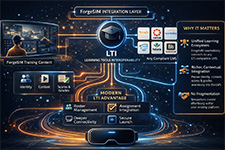
LTI (Learning Tools Interoperability) provides the integration layer between ForgeSIM and external learning management systems. Unlike SCORM, LTI establishes trust, identity, and context between platforms: it knows who the learner is, what course they came from, and passes scores and grades seamlessly into the LMS. Modern LTI Advantage extends this with roster management, assignment integration, and deeper platform connectivity. LTI ensures ForgeSIM simulations coexist with your existing learning ecosystem without fragmentation.
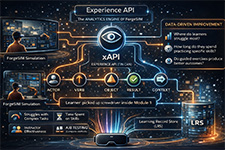
xAPI is the analytics powerhouse of ForgeSIM. Every learner action, from picking up a virtual tool to completing a procedural step, is recorded as a statement (Actor, Verb, Object, Result, Context) and stored in a Learning Record Store. This rich behavioral telemetry enables questions SCORM cannot answer: Where do learners struggle most? How long do they spend practicing specific skills? Do guided exercises produce better outcomes than self-directed ones? xAPI positions training teams to move from compliance reporting to continuous, data-driven improvement.
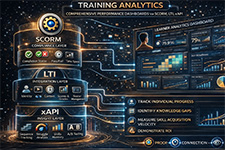
ForgeSIM combines SCORM, LTI, and xAPI into a layered analytics architecture: SCORM as the compliance layer (proof of completion), LTI as the integration layer (connected learning ecosystem), and xAPI as the insight layer (behavioral telemetry and performance optimization). Together, these standards enable comprehensive training analytics dashboards that track individual progress, identify knowledge gaps, measure skill acquisition velocity, and demonstrate ROI to stakeholders.
ForgeSIM integrates with enterprise learning ecosystems through support for industry-standard protocols.Whether your organization requires basic completion tracking, LMS integration, or rich behavioral telemetry, ForgeSIM provides the appropriate data layer to measure training effectiveness and demonstrate compliance.
LTI (Learning Tools Interoperability) provides the integration layer between ForgeSIM and external learning management systems. Unlike SCORM, LTI establishes trust, identity, and context between platforms: it knows who the learner is, what course they came from, and passes scores and grades seamlessly into the LMS. Modern LTI Advantage extends this with roster management, assignment integration, and deeper platform connectivity. LTI ensures ForgeSIM simulations coexist with your existing learning ecosystem without fragmentation.
xAPI is the analytics powerhouse of ForgeSIM. Every learner action, from picking up a virtual tool to completing a procedural step, is recorded as a statement (Actor, Verb, Object, Result, Context) and stored in a Learning Record Store. This rich behavioral telemetry enables questions SCORM cannot answer: Where do learners struggle most? How long do they spend practicing specific skills? Do guided exercises produce better outcomes than self-directed ones? xAPI positions training teams to move from compliance reporting to continuous, data-driven improvement.
ForgeSIM combines SCORM, LTI, and xAPI into a layered analytics architecture: SCORM as the compliance layer (proof of completion), LTI as the integration layer (connected learning ecosystem), and xAPI as the insight layer (behavioral telemetry and performance optimization). Together, these standards enable comprehensive training analytics dashboards that track individual progress, identify knowledge gaps, measure skill acquisition velocity, and demonstrate ROI to stakeholders.
Hardware Integration
ForgeSIM extends beyond screen-based simulation through ForgeSIM CONTROL, a hardware integration system that connects physical equipment controls to virtual training environments. This enables high-fidelity procedural training where learners use real joysticks, levers, switches, and controls to operate simulated equipment, building genuine muscle memory and operational confidence.
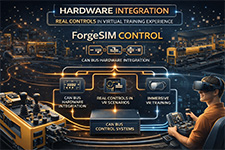
ForgeSIM CONTROL connects physical joysticks, levers, and switches to virtual training environments via custom CAN BUS systems. This hardware integration enables operators to train on the actual controls they will use in the field, paired with immersive VR environments that reinforce procedural fluency and spatial awareness. ForgeSIM CONTROL has been deployed with Vermeer horizontal directional drill simulators, connecting real drill controls to VR training scenarios for 600+ global dealer locations.

ForgeSIM supports deployment on mobile VR hardware, eliminating the need for external base stations and restrictive cabling.The improved optics, precise hand tracking, and responsive haptic feedback of modern standalone headsets enhance the training environment while reducing logistical constraints. This enables flexible, scalable deployment across hundreds of locations without dedicated VR infrastructure.
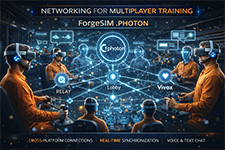
ForgeSIM includes networking capabilities powered by Photon for multiplayer training experiences. ForgeSim.Photon enables real-time synchronization between multiple trainees, supporting collaborative training scenarios, instructor observation, and remote assessment. Unity Relay and Lobby services facilitate cross-platform connections, while Vivox provides integrated voice and text chat for communication during training sessions.

ForgeSIM is built on a robust technology stack: Unity 6 (game engine), Universal Render Pipeline (cross-platform graphics), OpenXR (unified XR API), XR Interaction Toolkit with ForgeSIM extensions (interaction system), Netcode for GameObjects and Photon PUN (networking), Unity XR Hands (hand tracking), Shader Graph (visual shader authoring), Timeline (animations and cinematics), TextMesh Pro (text rendering), Burst compiler (performance optimization), and Addressables (memory management). All third-party components use permissive licenses (MIT, Unity Companion License).
ForgeSIM CONTROL connects physical joysticks, levers, and switches to virtual training environments via custom CAN BUS systems. This hardware integration enables operators to train on the actual controls they will use in the field, paired with immersive VR environments that reinforce procedural fluency and spatial awareness. ForgeSIM CONTROL has been deployed with Vermeer horizontal directional drill simulators, connecting real drill controls to VR training scenarios for 600+ global dealer locations.
ForgeSIM supports deployment on mobile VR hardware, eliminating the need for external base stations and restrictive cabling.The improved optics, precise hand tracking, and responsive haptic feedback of modern standalone headsets enhance the training environment while reducing logistical constraints. This enables flexible, scalable deployment across hundreds of locations without dedicated VR infrastructure.
ForgeSIM includes networking capabilities powered by Photon for multiplayer training experiences. ForgeSim.Photon enables real-time synchronization between multiple trainees, supporting collaborative training scenarios, instructor observation, and remote assessment. Unity Relay and Lobby services facilitate cross-platform connections, while Vivox provides integrated voice and text chat for communication during training sessions.
ForgeSIM is built on a robust technology stack: Unity 6 (game engine), Universal Render Pipeline (cross-platform graphics), OpenXR (unified XR API), XR Interaction Toolkit with ForgeSIM extensions (interaction system), Netcode for GameObjects and Photon PUN (networking), Unity XR Hands (hand tracking), Shader Graph (visual shader authoring), Timeline (animations and cinematics), TextMesh Pro (text rendering), Burst compiler (performance optimization), and Addressables (memory management). All third-party components use permissive licenses (MIT, Unity Companion License).